Technical SEO Checklist for 2026: 13 Fixes for Google and AI Search


Your website might look perfect to visitors, but be completely invisible in traditional and AI Search. Technical SEO is the hidden foundation determining whether search engines and AI platforms can find, understand, and feature your content in search results.
Technical Search Engine Optimisation (SEO) can make or break your website’s chances of reaching the top of Google. If Google’s bots can’t access, read, or understand your site, your content won’t rank, no matter how good it is.
The same applies to AI Search.
AI tools like ChatGPT, Perplexity, and Gemini rely on similar technical signals to discover and interpret website content. Your website may be excluded entirely from AI-generated responses if it is not technically optimised.
To help you prepare, we sat down with Andrew Tuxford, Head of SEO at Exposure Ninja, to understand how technical SEO impacts AI Search visibility. We’ve also put together a 13-point technical SEO checklist covering the fundamentals Google relies on, plus what matters most for AI Search Optimisation.
What Is Technical SEO?
Technical SEO encompasses all the behind-the-scenes optimisations that help search engines and AI platforms access and understand your website effectively. Unlike visible content changes, technical SEO focuses on the invisible infrastructure that supports your site’s discoverability.
Andrew Tuxford explains, “Technical SEO is all the things that wouldn’t be visible to a user on the website, but bots are reading.”
Technical SEO includes elements like site speed, mobile responsiveness, site architecture, and schema markup. These elements might not be visible to users, but they’re crucial for how search engines and AI platforms interpret your content.
Why Technical SEO Matters for Google and AI Search
Before we get into why technical SEO matters for AI Search, let’s rewind to how it works for traditional search engines.
Traditional search platforms like Google use automated web crawlers to discover and evaluate websites through this process:
- Crawling: Crawling is how search engines discover your content. Bots follow links from one page to another to map out your site and find new or updated pages.
- Parsing: Once a page is found, the bot parses (or “reads”) the HTML code to identify key elements like headings, metadata, internal links, and content blocks.
- Rendering: If the page uses JavaScript, the bot may render it. This means it loads the page in a headless browser to see how it would appear to users and to access content that isn’t in the raw HTML.
- Indexing: The content is stored in the search engine’s index after parsing and rendering. This allows your page to appear in search results for relevant queries.
Technical SEO creates the infrastructure that enables this process. Proper site architecture helps bots crawl efficiently, clean code helps them parse content accurately, and structured data helps them index information correctly.
But your visibility can vanish overnight when any part of that process breaks. Andrew Tuxford shares an example: “A website moved to a new domain and built the entire page in JavaScript. The website looked amazing from a user perspective, but it lost all its traffic because crawlers weren’t rendering the JavaScript.” This technical error completely wiped out the site’s visibility because bots couldn’t access any content.
The same principle applies to AI Search. AI platforms like ChatGPT and Perplexity use their own bots to crawl websites and gather information for responses. If AI bots can’t crawl your pages effectively, your content won’t appear in AI-generated responses, regardless of how valuable or relevant it might be.
While AI Search Optimisation differs from SEO, both rely on solid technical foundations to understand your content structure, topic relationships, and authority signals.
Technical SEO informs how bots access, read, and understand your website. That means if a bot can’t access it, they won’t know it exists, and so they can’t rank it. If they don’t understand it, they still may rank it, but you’ll end up with the wrong traffic. The same applies for AI platforms. If your content isn’t accessible or clearly structured, it won’t appear in citations or AI answers.
 Andrew Tuxford
Head of SEO
Andrew Tuxford
Head of SEO
The Technical SEO Checklist for 2026
Work through these 13 checks in order. The first five make sure bots can find and read your pages at all, the next five make your site fast, secure and easy to navigate, and the last three help search engines and AI tools understand what your content is about.
| Action | Why it Matters for AI Search Why it matters |
| Fix technical audit errors | Removes barriers preventing AI bots from accessing your content. |
| Check your robots.txt file | Makes sure you’re not blocking Google or AI crawlers by mistake. |
| Make sure your pages are indexed | A page that isn’t indexed can’t appear in search results. |
| Use canonical tags | Tells search engines which version of a duplicate page to rank. |
| Don’t rely on JavaScript for key content | Major AI crawlers don’t render JavaScript, so they can miss it entirely. |
| Enhance site architecture | Helps AI understand content relationships and topic hierarchy. |
| Fix broken links and redirect chains | Stops bots and users hitting dead ends and wasting crawl time. |
| Speed up Core Web Vitals | Prevents AI bots from abandoning slow-loading pages. |
| Optimise for mobile-first indexing | Google indexes and ranks the mobile version of your site. |
| Use HTTPS | A confirmed Google ranking signal, and builds trust with visitors. |
| Use schema markup | Research shows schema markup improves AI Search visibility by 30%. Labels your content so search engines and AI tools can understand it. |
| Clean content structure | Enables AI bots to properly understand and cite your content. |
| Set up hreflang (international sites) | Shows the right language or country version to the right searchers. |
Fix Technical Audit Errors
A technical SEO audit works like a website health check. It scans for problems that could stop bots from crawling, rendering, or indexing your content correctly. These include things like broken internal links, missing or duplicate meta descriptions, incorrect canonical tags, low text-to-HTML ratios, and JavaScript rendering issues.
Some issues are simple SEO fixes, like adding missing alt text to images or correcting broken links. Others are more complex, such as crawl-depth errors or misconfigured structured data. These may require input from your developer or SEO consultant.
You don’t need deep technical knowledge to run an audit. Tools like Semrush walk you through the process step by step. Once you enter your site, the tool crawls your pages, highlights issues, and suggests how to fix them.
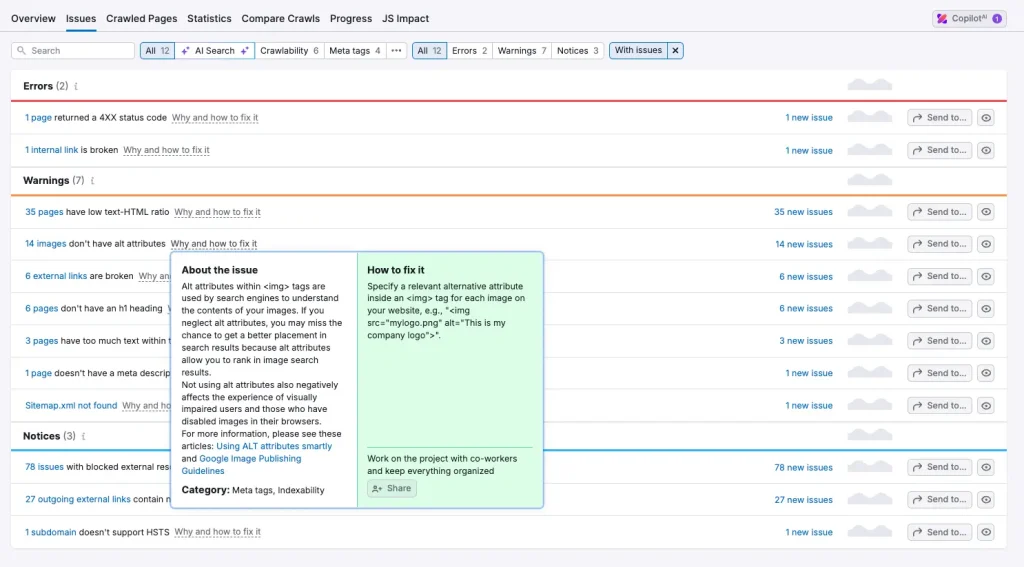
Other useful tools include Screaming Frog, Ahrefs, SE Ranking, Sitebulb, and Google Search Console. Most offer prioritised issue lists with explanations, making it easier to focus on the most important fixes.
“Most businesses should run technical audits at least monthly, definitely no longer than quarterly,” says Andrew Tuxford. “Regular checks help you catch problems before they affect your AI Search visibility.”
If you’d rather hand the audit and fixes over to specialists, our technical SEO services cover everything on this checklist.
Check Your robots.txt File
Your robots.txt file tells crawlers which parts of your site they can and can’t access. It’s a small file with a big impact: a single “Disallow: /” line left over from a staging site can stop search engines crawling your whole site.
Check it by visiting yourdomain.com/robots.txt and making sure nothing important is blocked, including the CSS and JavaScript files bots need to render your pages. Bear in mind that robots.txt controls crawling, not indexing. If you want to keep a page out of Google, use a noindex tag instead.
AI platforms use their own crawlers, and you can control each one separately. OpenAI, for example, uses OAI-SearchBot to surface websites in ChatGPT search, and GPTBot to collect content for training its models. Blocking OAI-SearchBot means your site won’t be shown in ChatGPT search answers, while blocking GPTBot only opts you out of training. Google’s equivalent, Google-Extended, controls whether your content is used for Gemini, but doesn’t affect your inclusion in Google Search.
If you want to be cited in AI answers, make sure you’re not blocking the search crawlers by accident.
Make Sure Your Pages Are Indexed
A page that isn’t in Google’s index can’t rank, however good it is. The Page indexing report in Google Search Console shows which of your pages are indexed and, for those that aren’t, why.
Look out for important pages listed under reasons like “Excluded by ‘noindex’ tag”, “Crawled – currently not indexed” or “Duplicate without user-selected canonical”. You can check any single page with the URL Inspection tool, and request indexing once you’ve fixed the problem.
Submitting your XML sitemap in Search Console (covered under site architecture below) also helps Google find your important pages faster.
Use Canonical Tags to Handle Duplicate Content
Duplicate content often happens without anyone noticing. The same page can be reachable at several URLs: with and without “www”, over HTTP and HTTPS, with tracking parameters, or through filtered category pages on an eCommerce site. When that happens, search engines have to guess which version to rank.
A canonical tag removes the guesswork by pointing to the version you want indexed. Give every page a self-referencing canonical, and point duplicates and near-duplicates to the main version. Google treats canonicals as a strong hint rather than a rule, so back them up with consistent internal links and redirects to your preferred URLs.
Don’t Rely on JavaScript for Key Content
Remember Andrew’s example of the site that lost all its traffic after rebuilding in JavaScript? Google can render JavaScript, but it takes extra resources and isn’t guaranteed. Most AI crawlers don’t render it at all. Vercel’s analysis of AI crawler traffic found that none of the major AI crawlers, including GPTBot, ClaudeBot and PerplexityBot, currently render JavaScript. They may download your JavaScript files, but they don’t run them.
If your main content, navigation or internal links only appear after JavaScript runs, AI tools may see a blank page. To check, view your page source or turn off JavaScript in your browser. If your key content disappears, talk to your developer about server-side rendering or pre-rendering so it’s in the HTML from the start.
Enhance Site Architecture
A clear, well-structured site makes it easier for search engines and AI bots to crawl, interpret, and prioritise your content. It also helps them understand how your pages connect and which topics you’re an authority on.
Here’s how to improve your site architecture for AI Search visibility:
- Use logical, clean URLs. Keep URLs concise, descriptive, and consistent. Group related content under relevant folders to reinforce topic clusters and site organisation.
- Build strong internal linking between related pages. Use keyword-relevant anchor text to guide bots through your site and signal which pages hold the most authority. This helps AI understand how topics connect and which content is central to your offering.
- Maintain a complete XML sitemap. Include all critical pages in your sitemap and submit it through Google Search Console. This ensures bots know exactly what exists on your site.
- Optimise your navigation. Keep your main navigation simple, logical, and consistent across all pages. Use breadcrumb trails to reinforce your site’s structure and support user experience and bot interpretation.
- Support topic clusters. Use an AI-friendly blog content strategy by building content hubs with a pillar page linking out to related subtopics. This structure makes it easier for AI models to understand your expertise across an entire subject area.
Fix Broken Links and Redirect Chains
Broken links send users and bots to 404 pages, and every dead end wastes the time a crawler spends on your site. Your audit tool will list them. Either update the link or, if the page has moved, add a 301 redirect to the closest matching page.
Watch for redirect chains too, where one redirect points to another, then another. Each extra hop slows things down. Point redirects straight to the final URL, and update internal links so they go directly to the live page rather than through a redirect. This is especially important after a site migration or redesign, when old URLs tend to pile up.
Speed Up Core Web Vitals
Core Web Vitals are a set of performance metrics defined by Google that measure how fast, stable, and responsive your site is for real users. You can check your site’s Core Web Vitals report in Google Search Console to see how you’re performing.
There are three metrics, and Google’s targets for a good score are:
- Largest Contentful Paint (LCP): your main content loads within 2.5 seconds.
- Interaction to Next Paint (INP): your page responds to clicks and taps in under 200 milliseconds. INP replaced First Input Delay (FID) as a Core Web Vital in March 2024, so older guides may still mention FID.
- Cumulative Layout Shift (CLS): a score under 0.1, meaning elements don’t jump around as the page loads.
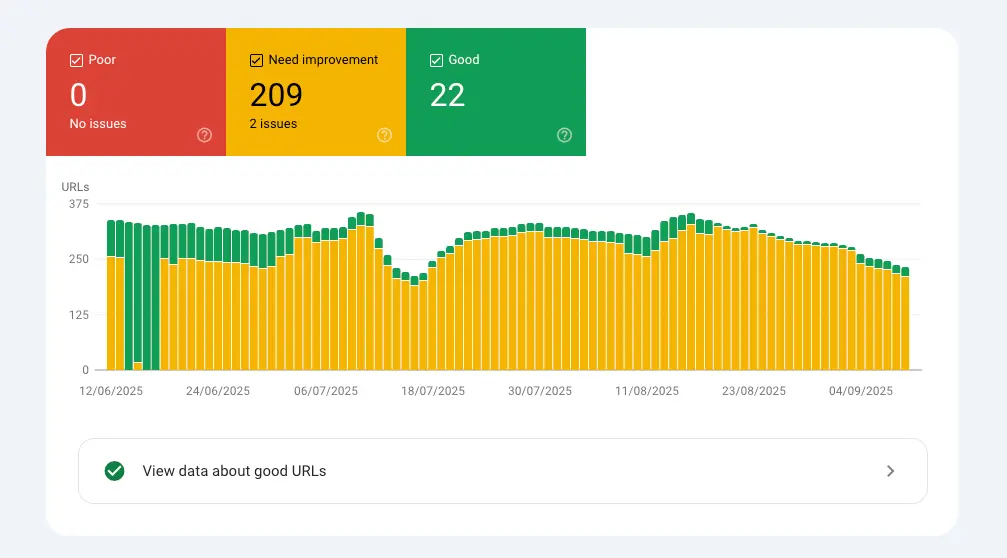
While these metrics are designed with users in mind, they also affect how efficiently AI bots can access and process your content.
“If your site is slow, search engine bots may not crawl it properly or at all,” explains Andrew Tuxford. “That includes AI bots. They work quickly and at scale. If your site takes too long to load, they’ll likely skip it and pull information from a faster competitor instead.”
Here are some tips to increase site speed:
- Compress and convert images to modern formats like WebP to reduce load time.
- Use a CDN to deliver content quickly across different geographic regions.
- Minimise unused JavaScript and CSS to streamline the code bots need to process.
Even small speed improvements can make a noticeable difference in how bots access and prioritise your content.
Optimise for Mobile-First Indexing
Google uses the mobile version of your site, crawled with its smartphone crawler, for indexing and ranking. If something only exists on your desktop site, Google may not see it.
The simplest way to stay safe is a responsive design that shows the same content on every device. Check that your mobile pages include the same main content, headings, structured data, meta titles and descriptions, and images with alt text as your desktop pages. Don’t hide important content behind tabs or accordions that only load when tapped.
Secure Your Site With HTTPS
Google confirmed HTTPS as a ranking signal back in 2014, and most browsers now warn visitors when a site isn’t secure. Most sites have made the switch, but it’s worth checking the details:
- Every HTTP URL redirects to its HTTPS version with a single 301.
- Your SSL certificate is valid and set to renew automatically.
- There’s no “mixed content”, such as images or scripts still loading over HTTP.
- Canonical tags, internal links and your XML sitemap all use the HTTPS URLs.
Use Schema Markup
“If I had to give businesses one single technical SEO priority for AI Search, it would be schema markup,” says Andrew Tuxford.
Schema markup is a type of structured data added to your website’s code. It helps search engines and AI platforms understand the meaning, context, and relationships within your content. By clearly labelling key elements, like your business information, products, or articles, you make it easier for bots to interpret and feature your content.
In a small test by Aiso, adding schema markup to a page produced roughly 30% better accuracy when ChatGPT retrieved information from it. It’s one experiment, not a guaranteed uplift, but it shows how much easier clear labelling makes it for AI tools to understand your content.
It’s worth knowing that Google says structured data isn’t required to appear in its generative AI features, and there’s no special schema you need to add for them. Schema won’t get you into AI Overviews on its own, but standard markup like Organization, Article, Product and FAQ still helps search engines understand and present your content.
Clean Content Structure
Clean content structure is how your content is organised and marked up within the page’s HTML. In technical SEO, this includes using proper heading tags, consistent formatting, and clear content hierarchy.
When structured properly, this makes it easier for AI bots to scan and understand your content. It signals the main topics, subtopics, and supporting details, helping AI tools like ChatGPT and Google’s AI Overviews decide how and where to feature your content.
“Heading tags are technical because they affect the structure of the page and how the code is understood, but they also have visual representation,” explains Andrew Tuxford.
In other words, they’re a win-win. Clean structure improves readability for users and provides essential context to search engines and AI models.
To improve your content structure:
- Use only one <h1> per page for the main topic.
- Break content into logical sections using <h2> and <h3> tags.
- Avoid skipping heading levels, like jumping from <h2> to <h4>.
- Keep paragraphs short and easy to scan.
- Use bullet points and numbered lists to highlight key information.
Set Up hreflang for International Sites
If you have versions of your site for different countries or languages, such as separate UK and US pages, hreflang tags tell Google which version to show to which searchers. Without them, your US page might rank in the UK, or the two versions might be treated as duplicates.
Each version should list every other version, including itself, using language and country codes like “en-gb” and “en-us”. Add an “x-default” version for visitors who don’t match any of them. Missing return links are the most common mistake, so check them in your audit tool. For larger multi-region sites, hreflang is usually part of a wider enterprise SEO setup.
If your site only serves one country in one language, you can skip this one.
Tips to Future-Proof Your Technical SEO for AI Search
“It’s difficult to provide future-proof technical SEO tips for AI Search because we don’t know how LLMs are going to develop and what may change with them,” Andrew Tuxford explains.
That said, certain best practices will remain relevant, especially as AI platforms continue using bots to access and interpret your content. Here’s how to stay ahead:
- Use Structured Data: Schema markup helps bots understand the context and meaning of your content. It increases your chances of appearing in traditional search results and AI-generated answers.
- Stay on Top of Technical SEO Basics: Regularly check crawlability, site speed, internal linking, and page structure. If bots can’t access or understand your content, they can’t feature it in results or citations.
- Monitor robots.txt Developments: “There is some discussion in the community about whether we need a specific robots.txt file for LLM robots,” Andrew Tuxford explains. While not currently necessary, monitoring these developments could prevent future visibility issues. The same goes for llms.txt files. Google says Search ignores them, so they won’t help or harm your Google visibility, and no major AI platform has confirmed it uses them yet. Our GEO strategy guide covers where they fit.
- Set Up Proactive Monitoring: Technical SEO is not a one-time task. Use audit tools and alert systems to catch errors before they impact your AI Search visibility.
Build a Solid Foundation for Traditional and AI Search Success
Here’s a technical SEO checklist recap:
- Regular technical audits to catch and fix issues early.
- A robots.txt file that doesn’t block Google or AI search crawlers.
- Important pages indexed, with canonical tags pointing to the right versions.
- Key content in the HTML, not dependent on JavaScript.
- Crawlable, parseable, and indexable site structure.
- No broken links or redirect chains.
- Fast, stable pages with strong Core Web Vitals.
- A mobile site with the same content as desktop.
- HTTPS across the whole site.
- Structured data using schema markup.
- Clean content hierarchy using proper heading tags.
- hreflang set up correctly if you run international versions.
Whether you aim to reach the top of Google or secure visibility in AI-generated responses, technical SEO is the foundation on which everything depends.
One of our clients (name withheld for confidentiality) saw a dramatic improvement in AI Search visibility through technical SEO alone. When we started their campaign, only 10% of their AI Overview-eligible keywords featured their website. After refining their technical SEO, we increased that figure to nearly 30%.
“All our influence on that campaign was technical,” explains Andrew Tuxford. “We tracked their AI visibility in a live scorecard, and you could see the growth clearly. Despite no major content changes, their AI Search performance improved significantly.”
This result highlights what we see across many client campaigns: technical SEO is what enables everything else to work.
Need help getting your foundation right? Request your AI and SEO Audit to find out how your website performs and what you need to fix to grow.
Read Next:
FAQs
What should a technical SEO checklist include?
A good technical SEO checklist covers how search engines find, read and understand your site. That means fixing audit errors, checking your robots.txt file, making sure important pages are indexed, using canonical tags, keeping key content out of JavaScript, building a clear site architecture, fixing broken links and redirect chains, improving Core Web Vitals, optimising for mobile-first indexing, using HTTPS, adding schema markup, structuring content with proper headings, and setting up hreflang if you run international versions of your site.
Can AI crawlers read JavaScript?
Mostly, no. Vercel’s analysis of AI crawler traffic found that none of the major AI crawlers, including OpenAI’s GPTBot and Anthropic’s ClaudeBot, render JavaScript. If your content only appears after JavaScript runs, AI tools may not see it. Google can render JavaScript, but serving key content in the HTML is still the safest approach for both.
How often should I do technical SEO?
Technical SEO is a constant process rather than a one-time project. Most businesses should run technical audits at least monthly if they have a dedicated digital marketing team. If you’re working with limited resources, quarterly technical reviews are the absolute minimum to maintain good site health and prevent issues from impacting your search visibility.
Which schema types should I prioritise for AI Search visibility?
Focus on Organisation schema for your business information, plus Service or Product schema depending on what you offer. Most businesses also benefit from Article schema for blog content and FAQ schema for common questions. The exact schema types depend on your content, but these core types provide the structured data that AI platforms need to effectively understand and feature your content.
How will improving site speed change my visibility in AI Search?
Faster sites make it easier for AI bots to crawl and access your content effectively. Slow sites may cause AI bots to abandon crawling attempts and move to competitors instead. While we don’t know if site speed directly impacts AI search rankings like it does for Google, faster sites ensure AI bots can access your content reliably and completely.
What technical audits will reveal AI Search blockers on my site?
Comprehensive technical audits using tools like Semrush, Screaming Frog, or Ahrefs will identify crawl errors, broken links, and accessibility issues that prevent AI bots from reaching your content. These audits also reveal missing or incorrect schema markup, slow-loading pages, and structural problems that make it difficult for AI to understand your content. Regular audits help you fix these blockers before they impact your AI Search visibility.