Multi-Location SEO: How to Rank Every Location (Local SEO for Multiple Locations)


SEO for multiple locations can be challenging, but the payoff is massive. Learn how to do multi-location SEO in this guide.
Ranking in local search results is crucial for driving online traffic to your website and foot traffic to your brick-and-mortar stores.
However, optimising your SEO for multiple locations can be tricky.
You essentially need to create a local SEO strategy for each location you want to target.
Doing keyword research, creating content, and building links for 10, 20 or even 100+ locations can sound overwhelming.
But don’t worry, we’ve got you covered.
We’ve done multi-location SEO for a number of our clients, so we know the ins and outs of this process.
This comprehensive guide breaks down key local SEO tactics in simple steps so you can effectively promote each of your locations online.
With a tailored strategy for each of your locations, you can stand out in local search and map listings across multiple cities and regions.
This means more quality traffic finding your business locations near them, more customers walking through your doors, and more local SEO success.
Multi-location SEO is the process of making each of your business locations easy to find in search, by giving every location its own useful page, Google Business Profile, reviews, local links and consistent listings.
Our actionable local business SEO tips will help you:
- Create dedicated and optimised location pages
- Produce locally-focused content
- Build local links
- Claim and manage listings
- Get more positive local reviews
- Appear prominently in local pack results.
- Measure how each location is performing
Stuck with local SEO for multiple locations? Book a consultation with the team at Exposure Ninja and we’ll talk through where you are and what to do next.
We’ve helped several businesses rank for more than one location.
Here’s how we helped Personal Injury Law Firm improve its local search results in McAllen and San Antonio. Read the case study.
Create Location Pages
Creating individual pages for each location and service/location combination you want to target is a must if you want to do successful local SEO for multiple locations.
These pages signal that your business is relevant to searchers in those locations and offer a more personal experience to site visitors from that location.
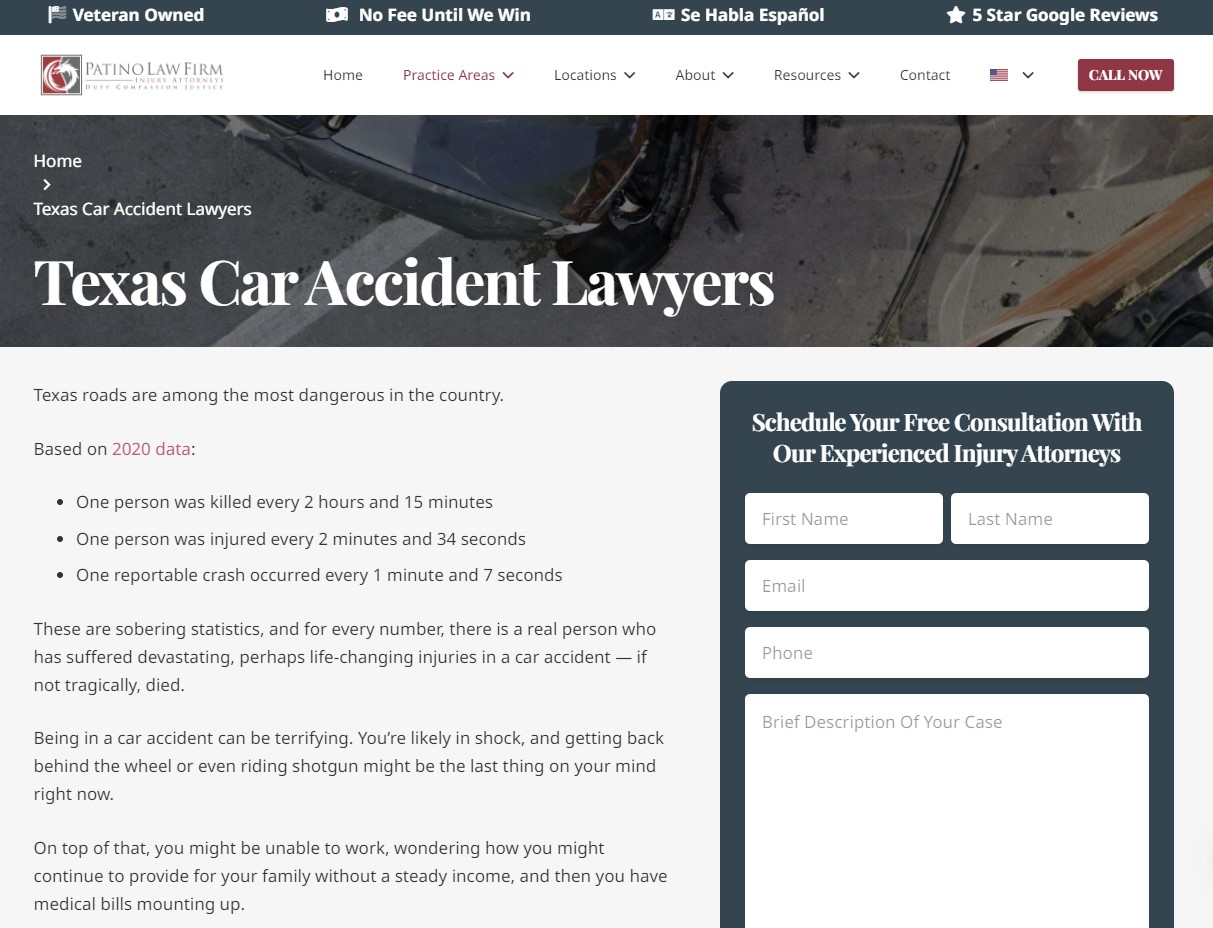
This Texas location page from Personal Injury Law Firm references stats specifically from Texas, making it more relevant to the reader. It also signals to Google that this business is based in Texas.
This page from our client, Regain Hearing, takes a slightly different approach, which is just as effective. It includes a photo of the staff from the specific branch being discussed on the page, and further up, includes the address and phone number for that specific location.
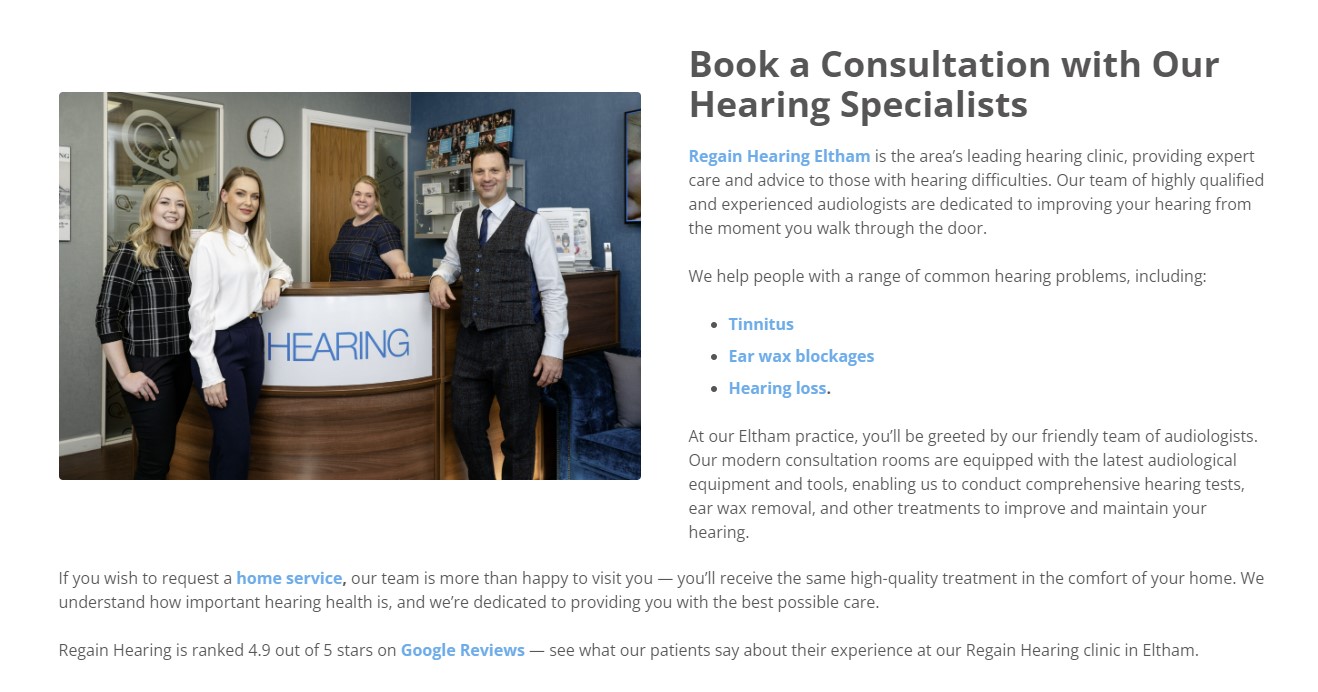
The location keyword of “Eltham” is naturally used throughout the text. It’s not shoved in there clumsily or used too many times.
The page also links to the location on Google Maps, giving Google even more information about the place this page is connected to.
Avoid Doorway Pages: What Makes a Location Page Unique
A location page earns its place when it is genuinely about that place. A page that repeats the same copy as every other location with only the town name swapped is the kind of page that gets a site into trouble.
Google’s spam policies describe doorway abuse as pages created to rank for similar searches that send people on to one destination. Its examples include multiple pages targeted at specific regions or cities that funnel visitors to a single page, and substantially similar pages that sit closer to search results than a clear, browseable site structure. Stuffing a page with blocks of text that simply list the cities or regions you want to rank for is called out too. You can read the detail in Google’s spam policies.
The test we use is simple: would a customer in that town find this page useful if it were the only page on your site they saw? If the answer is no, the page needs more local substance before it is published. Only create a page for a place where you have a location or genuinely serve customers.
Running a group of dental practices? Our local SEO guide for dentists covers the practice-level detail.
Location Page Template (What to Include)
Use the same template for every location, but fill it with details that are true for that location only:
- The business name, address and phone number for that location, matching its Google Business Profile exactly
- Opening hours, including any local differences such as bank holiday or seasonal hours
- An embedded Google Map and directions, including parking and public transport
- A photo of the actual premises and the team who work there
- The services available at that location, with links to the relevant service pages
- Reviews and testimonials from customers of that location, where you have permission to show them
- Local details that only someone who knows the area would include, such as nearby landmarks, areas served or local statistics
- Answers to the questions customers at that location ask most often
- A clear call to action: call, book or get directions
How to structure a URL for multiple locations
URL structure doesn’t need to be a complex topic.
In its simplest form, a well-structured URL for local SEO would be business.com/location.
This is clear to Google and to the website visitor.
Even if you have multiple locations in one city, you can create pages for each without complicated URLs.
Take the supermarket Tesco as an extreme example. It will have multiple stores in one city but still manage to keep the URLs straightforward. Here are some different URLs for its stores in Nottingham.
tesco.com/store-locator/nottingham/19-20-upper-parliament-st
tesco.com/store-locator/nottingham/2-carlton-hill
tesco.com/store-locator/nottingham/515-alfreton-rd
Each one links from the store locator page, followed by the city, followed by the first line of the address.
These URLs are simple, and using the address means that two locations on the same road (yes, it happens) will easily have separate URLs.
The “folders” of the URL must be in the right order. Each “/” represents a new subfolder, and the next “subfolder” belongs to the previous one.
So, in this example, all these pages belong to the “Nottingham” location.
You also need to consider if you have service and location combination pages and in what order you need to build the URLs. Do you put the service first (location belongs to the service) or the location first (service belongs to the location)?
Service/location is the most common, as the service is the same, and the change is the location it’s being done in, but if your service offering differs in different locations, you may want to do them the other way around.
An example of this would be:
/locksmith/london
/locksmith/manchester
/locksmith/birmingham
/plumbing/london
What about “near me” searches?

Google’s algorithm is smart.
It understands that if a person with their location set to Exeter searches for “Thai food near me”, they want to see Thai restaurants in Exeter, not the ones on the other side of the country that have optimised for the search term “near me”.
Even better than that, it shows them places that are physically closest to them. If you have the best SEO but are located 20 minutes away, then the business that’s five minutes away is more likely to rank higher for that specific search.
As long as you’re doing the work to rank for your specific locations, Google will handle the “near me” searches when someone near one of your locations makes a vague search.
Internal Linking Between Location and Service Pages
Make sure every location page can be reached in a few clicks and is linked from a store locator or locations index page, so both visitors and search engines can find it. Link each location page to the services offered there, and link each service page back to the locations that provide it.
Include every location page in your XML sitemap, and keep the sitemap up to date when you open or close a location.
Target Location-Specific Keywords
Location-specific keywords are another crucial part of local SEO.
They can be more challenging to find than keywords that don’t focus on a location, as they’re likely to be searched less. But this doesn’t mean that they’re not worth targeting.
Some keyword tools might even tell you that no one is searching for your local keywords, even if you know that people are.
Each location-focused page needs to target keywords based on the location covered on the page.
It can be tempting to try and target broader keywords with these pages. This might help you get traffic but could result in low conversions if visitors aren’t located in the area the page is focused on.
Local Content Creation
Creating local content tailored to each location helps to boost relevance and engagement.
This could involve writing a blog post highlighting community events or local news relevant to your business and each specific location.
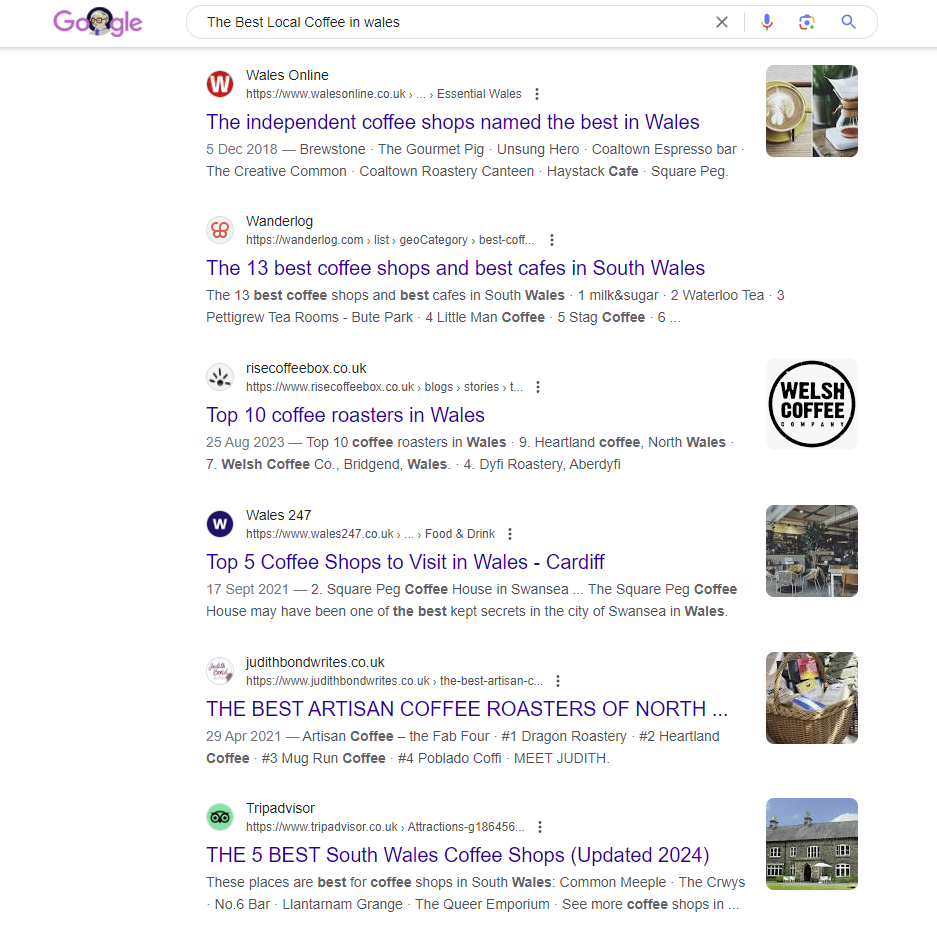
For instance, if you run a cafe, you could create a guide to “The Best Local Coffee in [Locality]” for each city where you have a location, like this one from Bridge Coffee Roasters.

A lot of people have incorrect assumptions when it comes to duplicate local content.
Duplicate content on its own is not a penalty, but copying one page and swapping the town name is risky. Google’s spam policies cover doorway abuse (many similar pages made to rank for different places) and scaled content abuse (large amounts of unoriginal, low-value content made mainly to rank). Each location page and local blog post needs content that is genuinely about that place. See “Avoid Doorway Pages” above.
How to find local content topics
Creating local content might be daunting to start with, but it’s not that different to choosing more general topics.
If you’re stuck finding topics to springboard off, start with three sources: local news and events, the questions customers ask at each location, and the topics your local competitors already rank for.
For the most part, adding a local angle to your content will help you connect with local people.
For example, if you have a guide that ranks well, you may want to create a localised version of it.
Let’s say you’re a nationwide self-storage company with a successful guide to choosing the right self-storage option for you. You could create local versions of this guide.
These guides shouldn’t be carbon copies of one another. You need to use aspects of the local area to make the guides different.
- “Looking for a self-storage company in a quiet part of [location]? Storage4U is based in the X estate, which is away from the main roads and traffic.”
- “If your business is storing a lot of items, then Storage4U is the best option in [location] as we have the biggest storage units in the area.”
Another route you can take is reviewing local competitor content.
Type your local search term into Google and review the content that appears for that search.
Take inspiration from this content, but make something better. Make it more useful to potential local customers than the other local search content out there.
Social media for local SEO
Although social media doesn’t directly impact your local SEO, it can help you connect with people based in your locations, boosting website traffic to local pages and helping you climb the ranks.
Use local hashtags and share useful or entertaining content, depending on your audience and their preferences.
Some businesses also opt to have separate social media accounts for their different locations, which gives viewers a fully local experience.
The Gym Group is an example of a business that does this on a huge scale. Below are two different accounts for two separate The Gym Group gyms in the same city.
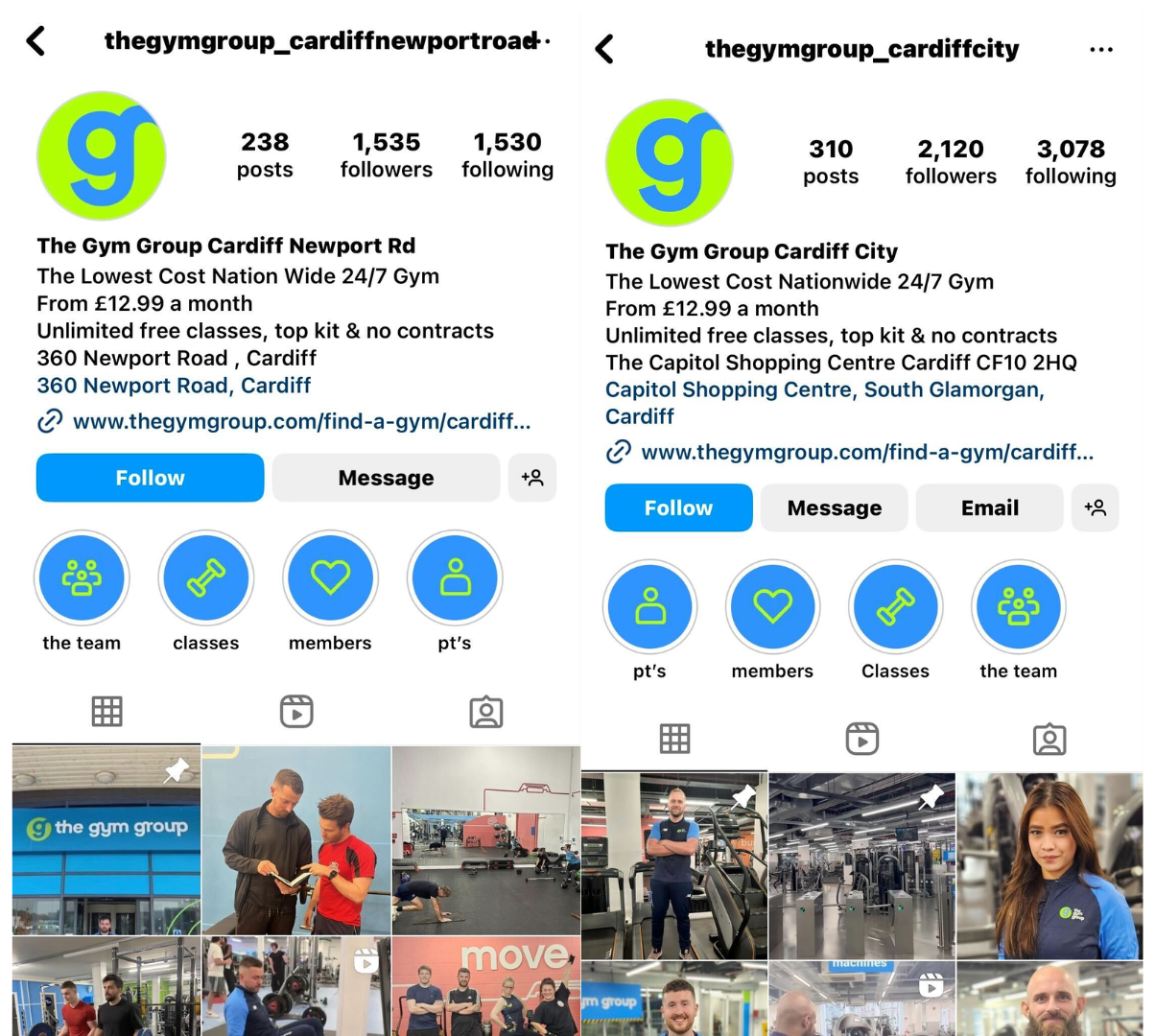
The information in the bios is similar but includes different addresses and contact options. The images and videos shared are of each gym, meaning users can see what they’ll get at the gym local to them.
Optimise for the Google Map Pack
Every business wants to appear in the map pack for local searches. It’s often the first place searchers look to see how close your business is.
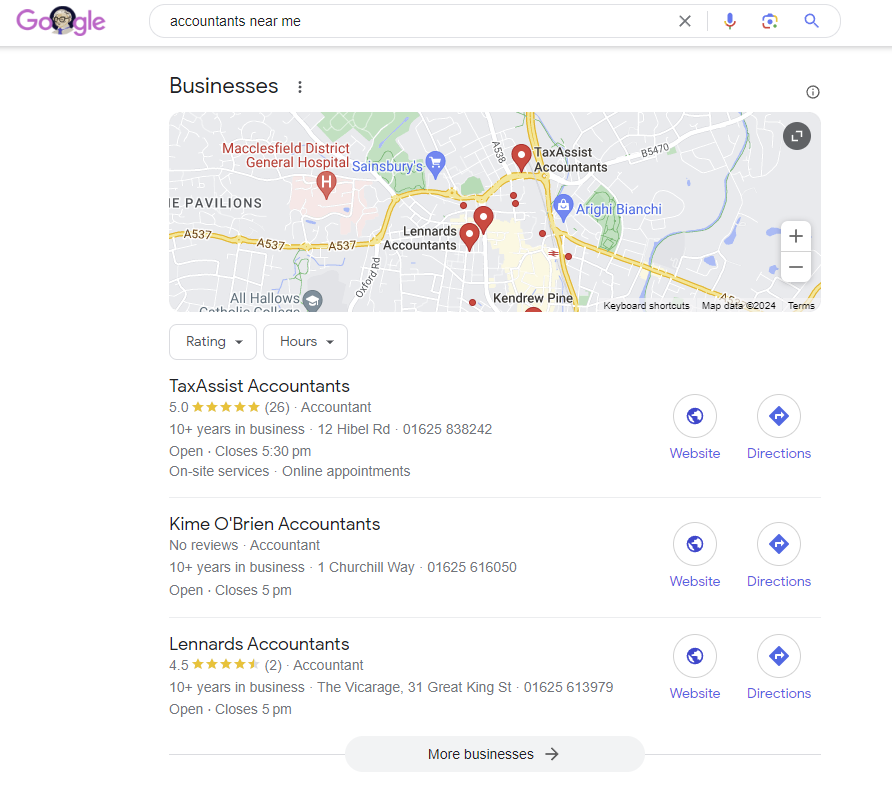
To appear in the map pack, you must have a solid Google Business Profile. Our Google Business Profile optimisation guide covers the setup in detail.
Can I have more than one Google Business Profile for my business?
If you have multiple physical locations, you can have more than one Google Business Profile, meaning you have more chances to appear in the map pack for local searches.
If you service a local area but aren’t based there, you can’t create a Google Business Profile for that location. You’ll be less likely to appear in the map pack.
That’s why you must have a solid local content strategy in place for each location you’re targeting.
Managing Google Business Profiles at Scale
Once you have more than a handful of locations, managing profiles one by one gets slow. If you have 10 or more profiles for the same business, you can ask Google to verify them in bulk by uploading a spreadsheet of your locations. Google’s help page says agencies managing more than one business cannot bulk verify, and service area businesses do not qualify. Read the full requirements in Google’s bulk verification guidance.
Whatever the size of your estate, the same habits help every location:
- Set each profile’s website link to that location’s own page, not the homepage
- Add UTM parameters to those links so profile traffic can be separated in GA4
- Use the same business name, address and phone number as the location page, exactly
- Keep opening hours up to date, including bank holidays
- Assign a named person to respond to reviews at each location
Google Business Profile insights
Your Google Business Profile (GBP) is for more than just ranking. It also helps you get some great insights, which can help you rank even higher and help you improve your profile so that potential customers can find you more easily in search.
The most important GBP metric you need to pay attention to for SEO is searches.
These are the searches your Google Business Profile appeared for. Using this data, you can check if you appear for the correct keywords. If you’re appearing for keywords you don’t want to be, you can make adjustments.
The importance of other metrics is very dependent on your business. If you offer bookings and the other business profiles appearing in the map pack for your target searches have the booking option enabled, you need to do this, too.
Customer reviews and their impact on local SEO
Customer reviews are an important element of local SEO.
Google wants its users to have a good experience, so it’s going to send users to sites with lots of good reviews.
It’s important for businesses with multiple locations to actively manage and respond to reviews across all of your locations and the various platforms on which you are listed.
Google reviews feed into prominence, one of the three things Google says it uses to rank local results, alongside relevance and distance. Positive reviews can help your local visibility, and negative reviews can work against it. Read more in our guide to how to get more Google reviews.
By monitoring and responding professionally to customer feedback on all sites and for all locations, you can reduce the impact of negative reviews, show customers you value their opinions, and ultimately build a strong online reputation that will benefit your local SEO.
Regularly asking for reviews for each location also helps generate more positive customer testimonials.
Keeping a close eye on reviews for all your business locations is essential for local SEO and can have a big impact on your conversion rates, too.
Multi-Location SEO in Practice: A Two-City Example
For a Texas personal injury firm, we rebuilt the website, rewrote key service and location pages and launched a targeted blog strategy. As rankings and leads improved, we expanded our focus from McAllen to San Antonio, a more competitive market, using what we had learned in the first city. We also optimised and regularly maintained the firm’s Google Business Profile and introduced ethical review generation. When map pack rankings dipped, we responded quickly, helping the firm regain and maintain the top three positions in both locations.
You can read the full Personal Injury Law Firm case study.
Service Area Businesses: Ranking Where You Don’t Have an Office
Not every business has a shopfront in every town it serves. Plumbers, cleaners, mobile mechanics and many consultancies travel to customers. Google treats these as service area businesses.
A service area business can list the areas it serves on its Google Business Profile and hide its address from customers. Google lets you add up to 20 service areas, set by city, postcode or another area, and recommends keeping them within about two hours’ drive of where the business is based. A business with separate teams based at different locations may be able to have a profile for each one, but virtual offices are not eligible. Check the current rules on Google’s help pages for service area businesses and setting your service area, as they change.
On your website, you can still create a page for a town you serve but have no office in, as long as the page is genuinely useful. Show the work you have done in that area, answer questions local customers ask, and make clear how you serve them. Do not create pages for places you do not actually cover.
Link Building for Multiple Locations
Link building in any relevant, quality publication is useful to your business, but you will get even better results if you build links to sites that serve the same areas as your business.
Having your business name and location mentioned and linked from trusted sites focusing on that specific city or region shows Google that your business actively operates and serves customers in that area while also proving that authoritative publications want to link to your awesome website.
Backlinking doesn’t just impact local SEO. It also helps you reach local people who are reading these publications, which could lead to business.
When it comes to local link building, our SEO and Digital PR teams look at popular local publications. Towns and cities often have local news websites , sometimes more than one. They may also have city guides, regional magazines, local radio station websites, directories and more.
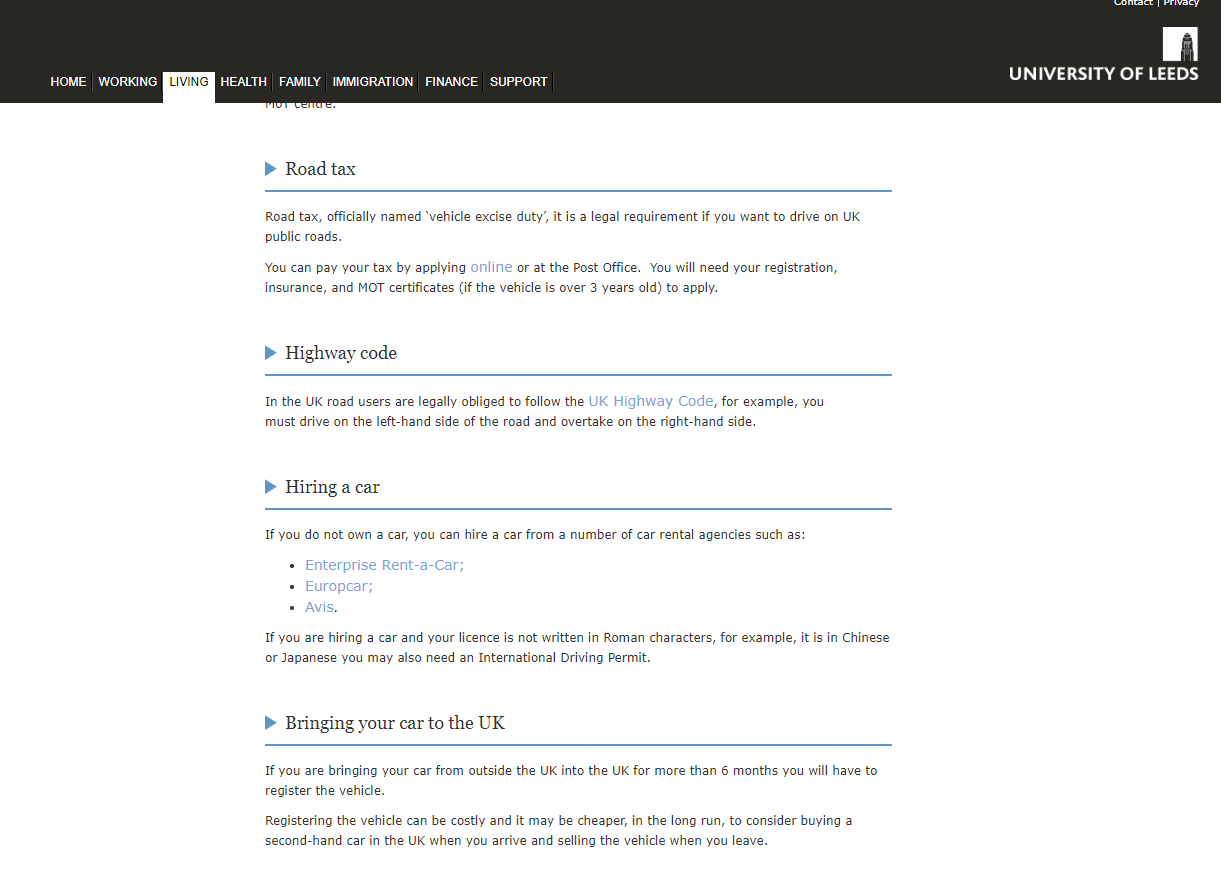
The example below shows multiple car rental companies with locations across the UK being linked to by the University of Leeds micro-site dedicated to helping those relocating to Leeds for university.
This is a very high-value domain which will help with SEO, and the links are likely to get clicks from people interested in hiring a car. Double win.
You can also get links and exposure to local people through sponsoring local sports teams, theatre productions or events.
Digital PR and link-building outreach isn’t easy. You need to be persistent and find ways to stand out from all the other businesses getting in touch with the same publications.
To help you get started, you can download our free outreach templates , or book a consultation to talk through how to scale your local link-building strategy.
For more tactics, see our guide to how to build backlinks.
Mobile Optimisation
Mobile optimisation is an important aspect of all SEO, not just local SEO.
Ignoring it could mean you drop in the search rankings.
Why? Mobile usage exceeds desktop usage. More searches now happen on mobile devices than on desktops, so Google favours mobile-friendly sites in rankings.
It favours them so much that Google only uses the mobile version of a site’s content to index and rank pages. They don’t look at your desktop version anymore.
Also, most searches for local businesses and services happen on mobile. Mobile optimisation helps make local content more accessible to these searchers.
So, how can you optimise for mobile?
- Improve your page speed. Slow mobile page speeds can negatively impact rankings. Optimising for mobile helps pages load faster.
- Improve your user experience. Poor mobile UX leads to higher bounce rates and fewer pages viewed per visit, which are ranking factors. Good mobile UX improves engagement metrics.
- Use responsive design. Google recommends responsive web design as the easiest pattern to implement and maintain, so you do not need a separate mobile site to rank. Read Google’s mobile-first indexing guidance.
Optimising for mobile is also important for future-proofing. As mobile continues to dominate, non-mobile-friendly sites will steadily decline in rankings. Building for mobile now future-proofs your SEO.
Check Directory Listings Are Consistent
Checking your directory listings are consistent and fully up-to-date is a quick win when you’re doing local SEO for multiple locations.
You may have added details to a local directory for your main location but recently opened a new location that’s more relevant to that directory. You can also add both locations to the directory if it covers the same area.
Check that your business name, address and phone number (also known as NAP) are consistent and accurate across all directories.
This will help Google connect your business to these directories and locations. It’s another signal that you are located where you say you are and that your business is relevant to people searching in that area.
Structured Data for Local Businesses
Structured data is important for your local businesses’ SEO because it allows Google to better understand your business information and display it prominently in search results.
Here is some of the main structured data you should be using, depending on your business:
Business name, address and contact info — By marking up this info with schema.org, it can appear in knowledge panels in SERPs, helping users easily find and contact you.
- Opening hours : marking up opening hours allows Google to display live updated business hours in the knowledge panel, avoiding wasted visits if you’re closed.
- Location : allows you to specify your location to Google. They will read your location from clues on the page, but this allows you to communicate it directly. This can be set either as an address, latitude and longitude coordinates or both.
- Service Area : allows you to specify the area covered by your service. This can be based on a distance from your location. For example, a 10-mile radius from the office or a pre-defined area, such as Berkshire (a county) or Nottingham (a city). Multiple service areas can be set, such as the counties of Nottinghamshire, Leicestershire, etc.
- Menus : restaurant menus marked up in schema can appear directly in SERPs, helping users quickly browse your offerings.
- Reviews
- : a business’s own reviews, including a Google reviews widget on its own site, are not eligible for star ratings in results. Review snippets are for sites that collect reviews about other businesses, so do not add review markup for your own business expecting stars.
- Events : schema for events enables rich event listing in SERPs that users can quickly add to their calendars. This is especially useful for businesses offering classes, activities or events.
- FAQ Page : marking up FAQs provides users with direct answers to common questions without needing to visit your site.
Structured data can generate rich search features when used correctly. This helps searchers engage with your business and trust you more.
You can set different locations and service areas for different offices if you cover multiple locations; these should be set individually per page.
Example: LocalBusiness Markup for One Location Page
Each location page should carry its own LocalBusiness markup, with a unique @id for that location and a link to the parent organisation. This is a sample for a fictional business. Replace every value with the real details for the location.
{
“@context”: “https://schema.org”,
“@type”: “LocalBusiness”,
“@id”: “https://www.example.com/locations/nottingham/#localbusiness”,
“name”: “Example Dental Care Nottingham”,
“url”: “https://www.example.com/locations/nottingham/”,
“telephone”: “+441154960000”,
“address”: {
“@type”: “PostalAddress”,
“streetAddress”: “1 Example Street”,
“addressLocality”: “Nottingham”,
“postalCode”: “NG1 1AA”,
“addressCountry”: “GB”
},
“openingHoursSpecification”: {
“@type”: “OpeningHoursSpecification”,
“dayOfWeek”: [“Monday”, “Tuesday”, “Wednesday”, “Thursday”, “Friday”],
“opens”: “09:00”,
“closes”: “17:30”
},
“parentOrganization”: {
“@type”: “Organization”,
“name”: “Example Dental Care”,
“url”: “https://www.example.com/”
},
“areaServed”: “Nottingham”
}
Google’s LocalBusiness structured data documentation sets out which properties are required and recommended. The name and address are required, and a specific URL, opening hours, geo coordinates and telephone number are recommended. The @id, parentOrganization and areaServed properties come from the schema.org vocabulary rather than Google’s page, and are there to make each location’s relationship to the business clear.
Structured data can get complex, so if you are unsure, it is best to consult a professional, as data that is misaligned with the content can cause more harm than good.
You can learn more about structured data from the wonderful folks at Google Search Central.
Structured data isn’t straightforward and requires some coding knowledge. If you’re unsure how to get started, have a chat with our friendly dev team.
Measuring Multi-Location SEO
With 10, 20 or 100+ locations, a single sitewide traffic figure hides what is working. Measure each location on its own:
- Google Search Console: filter by page, using the folder your location pages sit in, to see impressions, clicks and queries for each location
- Google Business Profile performance: calls, directions, website clicks, bookings and the searches your profile appeared for. Performance data is only available for verified profiles
- GA4: use the UTM parameters on your profile links to separate profile visits from other traffic, then track calls, bookings and form fills per location. Our GA4 guide explains the setup
- Local rank tracking: use a tool that checks your positions from several points around each location, because local results change from street to street
Review the figures monthly, and compare each location with the others to spot the ones that need more attention.
How to Target Multiple Locations with SEO
Local SEO is key for businesses with multiple locations. Local SEO strategies we’ve explored in this guide include:
- Creating dedicated location pages with geo-targeted content and keywords
- Using location names in page URLs
- Producing locally-focused blogs and social media for each location
- Reviewing competitor content for inspiration
- Building links, especially in local news and directory sites and getting mentioned in local publications
- Optimising for mobile, since most local searches are mobile
- Managing Google Business Profiles and reviews for all locations
- Ensuring consistent NAP in directories.
- Using structured data like opening hours, location(s) and service area(s)
- Monitoring analytics to optimise ranking for each location’s keywords.
With an effective local SEO strategy tailored to each location, your multi-location business can drive more nearby customers to your locations and give a massive boost to your local visibility and conversions.
If you would like a team to build this for you, our multi-location SEO services are a good place to start. If you manage 50 or more locations, see our enterprise SEO service.
Talk to us about your locations
Book a free consultation with our specialist team and we’ll talk through your locations, your goals and where to start.
Multi-Location SEO FAQs
What is multi-location SEO?
Multi-location SEO is the process of making each of your business locations easy to find in search. It means giving every location its own useful page, Google Business Profile, reviews, local links and consistent listings, rather than relying on one set of pages for the whole business.
Do I need a separate page for every location?
Yes, if you want each location to rank for searches in its area. Each page should include details that are true for that location only, such as its address, opening hours, team and customer reviews.
Can I use the same content on every location page?
You should not. Swapping the town name on otherwise identical pages is risky, because Google’s spam policies cover doorway abuse and scaled low-value content. Write each page so it is useful to someone in that town, and keep the shared template to the structure only.
Can I have more than one Google Business Profile?
If you have more than one physical location, you can have a profile for each one. Service area businesses are treated differently, so check Google’s current guidance before creating profiles.
How do I rank in a town where I don’t have an office?
You cannot create a Google Business Profile for a town you only serve, so focus on a useful page for that area, local content and local links, and list the area as a service area on your profile if you are eligible.
What to READ Next
What to WATCH Next