Create a Google Ads Strategy That Works


Ready to stop wasting ad spend and start seeing real results? Use our 10 proven tips to create a Google Ads strategy that delivers leads and sales, from smarter targeting to lower CPCs and higher ROI.
Google Ads is a fast-moving, competitive battleground.
Ad costs are rising, AI is reshaping campaign management, and data privacy changes are forcing businesses to rethink how they target and convert customers. If your Google Ads strategy isn’t evolving, you risk falling behind your competitors.
We’ll show you how to create a Google Ads strategy that actually works in 2025, using tested tips from Luke Nicholson, Exposure Ninja’s COO and Google Ads expert.
What Is a Google Ads Strategy?
A Google Ads strategy is your plan for using Google’s advertising platform to reach the right people at the right time, with the right message, and turn that into revenue.
It’s not just about picking keywords or writing catchy headlines. A proper strategy connects your business goals to every part of your campaign, from targeting and bidding to ad copy, landing pages, and conversion tracking.
A strong Google Ads strategy helps you:
- Avoid wasting budget on the wrong clicks
- Focus on keywords that drive real leads or sales
- Choose the right campaign types for your goals
- Track performance and scale what’s working.
Without a strategy, advertising on Google can quickly become expensive guesswork. With the right one, it becomes a predictable, scalable channel for growth.
With the rise of automation and AI, strategy matters more than ever. Google’s AI can manage bids, placements, and targeting — but it still needs direction. If your goals are unclear, your targeting is too broad, or your conversions aren’t set up properly, automation will optimise in the wrong direction.
10 Tips for a High-ROI Google Ads Strategy
Tip 1: Set SMART, Revenue-Focused Goals
Clicks mean nothing if they don’t turn into revenue. That’s why your Google Ads strategy should be built around SMART goals or goals that are Specific, Measurable, Achievable, Relevant, and Time-bound.
This kind of goal-setting helps you stay focused on real business outcomes, not vanity metrics.
Luke Nicholson explains how to set SMART goals:
- Define Clear Objectives: Start by identifying what success looks like for your business. This could be a revenue goal or something specific, like new customer acquisition.
- Use Conversion Tracking: Ensure that conversion tracking is set up properly so you can measure success. Also, ensure you’re only counting the conversions that really matter, like sales, qualified leads, or booked calls. Spam or non-qualified conversions will need to be filtered out.
- Set Timeframes: Goals without deadlines tend to drift. Give your campaigns a clear timeline so you can measure progress and course-correct if needed.
- Adjust for Realistic Budgets: Don’t overspend too quickly. Set a budget that aligns with your goals, then ramp up once you know what works.
- Evaluate and Adjust: Regularly assess your performance and adjust your bids, targeting, and keywords to stay on track.
Here’s what a clear, measurable, time-bound, and revenue-focused goal could look like:
Generate 50 new qualified leads per month through Google Ads at a cost per lead of £30 or less within the next 90 days.
Google Ads might be the biggest Pay-Per-Click (PPC) channel, but it’s probably not your only one. Make sure your Google Ads goals feed into your overall PPC strategy to ensure you’re working towards one clear target, not juggling separate metrics that don’t align.
Tip 2: Target High-Intent Keywords
Not all keywords are equal. Some attract browsers, while others attract buyers. The difference between these keywords is intent.
High-intent keywords are search terms that signal someone is ready to act — whether that’s making a purchase, booking a consultation, or signing up for a service. Think:
- “Buy ergonomic office chair UK”
- “Emergency boiler repair London.”
Notice how these high-intent keywords tend to be more long-tail. Luke Nicholson highlights, “Someone searching “buy running shoes for flat feet” is more likely to convert than someone just searching “running shoes.”
To find high-intent keywords, you need to start with solid keyword research. Luke Nicholson recommends:
- Google Keyword Planner: Use Google’s Keyword Planner to identify relevant terms, particularly those with high purchase intent. Focus on keywords like “buy [product]” or “best [service] near me” that indicate people are ready to make a decision.”
- Semrush Ad Clarity: It’s also helpful to look at competitors’ targeting strategies. Tools like Semrush’s Ad Clarity can show you which keywords they’re using and how much they’re spending.
And don’t forget negative keywords. Excluding irrelevant terms prevents budget-wasting clicks from people who were never going to convert in the first place.
Tip 3: Leverage AI Strategically
Google Ads uses AI to help advertisers get better results with less manual work.
But AI isn’t magic. It needs the right inputs to work properly: clear goals, accurate conversion tracking, and strong creative assets.
Used strategically, AI can help you spot trends, reach the right people, and improve performance at scale.
AI-Driven Bidding
Google’s Smart Bidding strategies, like Target ROAS (Return on Ad Spend), use AI to automatically set bids based on the likelihood of conversion.
Target ROAS is the easiest way to leverage AI-driven bidding, but Luke Nicholson warns that it can be a bit tricky. “The automated recommendations for Target ROAS can be quite low. Even Google’s Reps often recommend going slightly higher to improve performance. However, if you set your target too high, there’s a risk that your ads won’t optimise properly, which could harm your results.”
Start with a realistic ROAS target based on your actual profit margins. Then, monitor performance and adjust gradually. If it’s too low, you might waste budget. Too high, and your ads could stall altogether.
AI-Powered Audience Targeting
AI-powered audience targeting uses Google’s machine learning to help you reach the people most likely to convert — even if you haven’t defined that audience manually. Based on behaviour, interests, and previous actions, Google identifies patterns and shows your ads to users who fit your ideal customer profile.
But while AI can find lookalike audiences, your first-party data is still the most powerful targeting tool you have.
Luke Nicholson explains: “With privacy laws tightening, Google will likely encourage advertisers to make better use of first-party data and Customer Match targeting. Businesses will need to gather and use their own customer data more effectively to stay competitive.”
That means building and maintaining your own customer lists and using those audiences in your campaigns. Google’s AI can then use that data to find new prospects with similar behaviours and intent.
Tip 4: Match Campaign Types to Conversion Intent
Each Google Ads campaign type serves a different purpose. The key is matching the right type (or combination) to your SMART goals and where your audience is in their buying process.
Here’s a quick cheat sheet:
| Campaign Type | Overview | Best Used For |
| Search Campaigns | Text ads that appear on Google when users search for specific keywords. | High-intent leads actively searching for your product or service. Ideal for direct conversions. |
| Display Campaigns | Image or banner ads shown across Google’s Display Network. | Brand awareness, retargeting, and staying top-of-mind with potential customers. |
| Video Campaigns | Video ads that run on YouTube and other video partner sites. | Building awareness or educating new customers, especially at the top of the funnel. |
| Shopping Campaigns | Product-based ads that show images, prices, and details directly in search. | eCommerce businesses looking to drive product sales directly from search results. |
| Performance Max (PMax) | AI-driven campaigns that run across all of Google’s channels automatically. | Businesses looking for an easy, all-in-one solution to drive conversions with minimal manual setup. |
Luke Nicholson advises: “Search Campaigns are best when you want direct conversions. Display and Video Campaigns are better for staying top-of-mind or educating your audience. For eCommerce, Shopping Campaigns are a no-brainer.”
Rebecca Pilkington, Head of PPC, adds: “Performance Max is a great way to reach customers across the entire funnel. The more data you feed it, the smarter it gets, but success really depends on keeping your ad copy and creative fresh. We’ve seen consistently strong results with PMax for both eCommerce and lead gen campaigns.”
You also don’t need to choose just one. Often, the best results come from pairing campaigns, like using Search to capture demand and Display to remarket to non-converting visitors. The smarter your campaign mix, the more likely you are to hit your goals without wasting your budget.
Embed Quote: Luke Nicholson: “For most businesses, starting with one to three key campaigns is a good place to begin, whether that’s Search, Display, or Performance Max. From there, you can optimise and refine them based on data.”
Tip 5: Use Competitor Insights to Your Advantage
Luke Nicholson argues, “Sometimes the simplest strategies are the most effective. Learn what’s working for competitors so you don’t have to reinvent the wheel.”
You don’t need to guess what your competitors are doing — you can use tools like Google Ads Transparency to check the ads they’re running.
Let’s say you own a gym. Head to Google Ads Transparency, search for your competitor, and you’ll see all their current live ads. Here’s what this looks like for a potential competitor, PureGym:
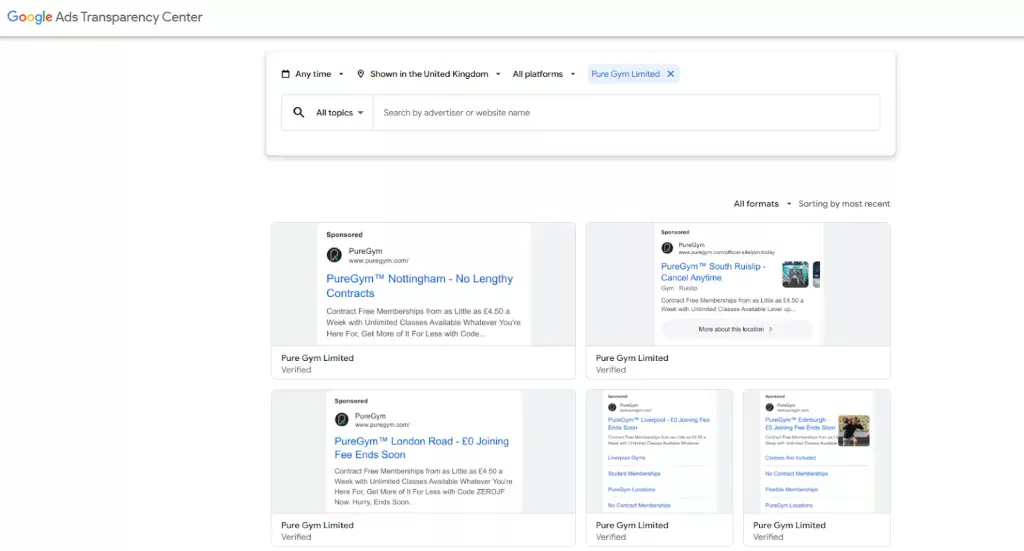
Pair this with Semrush’s AdClarity tool, which gives you the estimated ad spend across channels, trends over time, and landing pages. Here’s what to look for:
- Which campaign types they’re using
- What messaging they focus on
- Where they’re spending most of their budget
- What their landing pages look like.
The goal here is to learn, adapt, and build something better. Competitive insights can shortcut weeks of testing and help you focus your budget where it matters most.
Tip 6: Beat Competitors with Compelling Copy and Creatives
In competitive markets, average ads get ignored. If your copy and creative look like everyone else’s, you’ll lose attention (and conversions) fast.
Start by nailing the message of your Google Ads. Strong ad copy highlights what your audience actually cares about. To find this, Luke Nicholson advises looking at real-world feedback: “Use reviews, both of your own business and of competitors, to understand what customers do and don’t like.” These insights help you write copy that taps into real pain points and priorities, whether that’s speed, pricing, or trust.
You then need to match the message with scroll-stopping ad creative. That means bold visuals, real people, and clear value.
- Show your product or service in action.
- Use short, sharp text overlays to highlight your main benefit
- If you’re running video ads, hook viewers in the first five seconds. Lead with the pain point, then show the solution.
Tip 7: Optimise for Quality Score to Lower CPCs
A smart Google Ads strategy focuses on driving profitable traffic. That means aiming for high-quality clicks at the lowest possible cost-per-click (CPC). One of the most effective ways to achieve this is by improving your Quality Score.
Quality Score is Google’s rating (out of 10) of how relevant and useful your ads are to users. When your ad is more relevant to a user’s search, Google sees it as more helpful — which means they’re more likely to show it, and you pay less for the placement.
According to Google’s official guidance, Quality Score is based on three key factors:
- Expected Click-Through Rate (CTR): How likely users are to click on your ad
- Ad Relevance: How closely your ad matches the intent behind the keyword
- Landing Page Experience: How relevant and user-friendly your landing page is
To hit an “above average” Quality Score, Luke Nicholson recommends:
- Align Ad Copy and Keywords: Start by making sure your ad copy is highly relevant to the keywords you’re bidding on. This means writing copy that directly matches user intent.
- Match Ad Copy and Landing Page: Next, your landing pages need to align with your ads. They should offer a smooth, relevant experience to users when they click. It can be worth running some user testing or heat mapping software to see how genuine customers may interact with your pages.
- Group Related Keywords: Finally, group your keywords effectively into tightly themed ad groups. This ensures your ads are highly relevant to the searches you’re targeting, which can boost your Quality Score and lower your CPC.
But lower CPCs shouldn’t be the only goal. Luke Nicholson warns: “A common mistake businesses make is thinking solely in terms of total cost instead of ROI. If you focus too much on reducing CPC or cutting ad spend, you could end up sacrificing overall profitability.”
Instead, aim to improve Quality Score as part of a broader optimisation strategy. Yes, lower CPCs help — but what matters most is the return. Look at metrics like conversion value, customer lifetime value, and overall revenue. The real win is when that lower CPC leads to more conversions — not just cheaper traffic.
Tip 8: Create High-Converting Landing Pages
You’ve picked the right campaign type. You’ve nailed your ad copy and creatives. The click comes through, and then nothing. Visitors bounce, and your budget starts burning.
Sound familiar? Your landing page is the most likely problem.
Your landing page is where the conversion happens. If it doesn’t deliver on the promise made in your ad, users will leave — and you’ll be paying for clicks that go nowhere. That’s why sending traffic to a generic homepage or catch-all product page rarely works.
Instead, build tailored landing pages that match your ad’s message and the intent behind the search.
To convert consistently, a strong landing page should:
- Load quickly, especially on mobile
- Focus on one clear goal
- Include an above-the-fold form placement
- Reinforce trust with reviews, guarantees, and accreditations
- Guide users to take action with strong CTAs and minimal distractions.
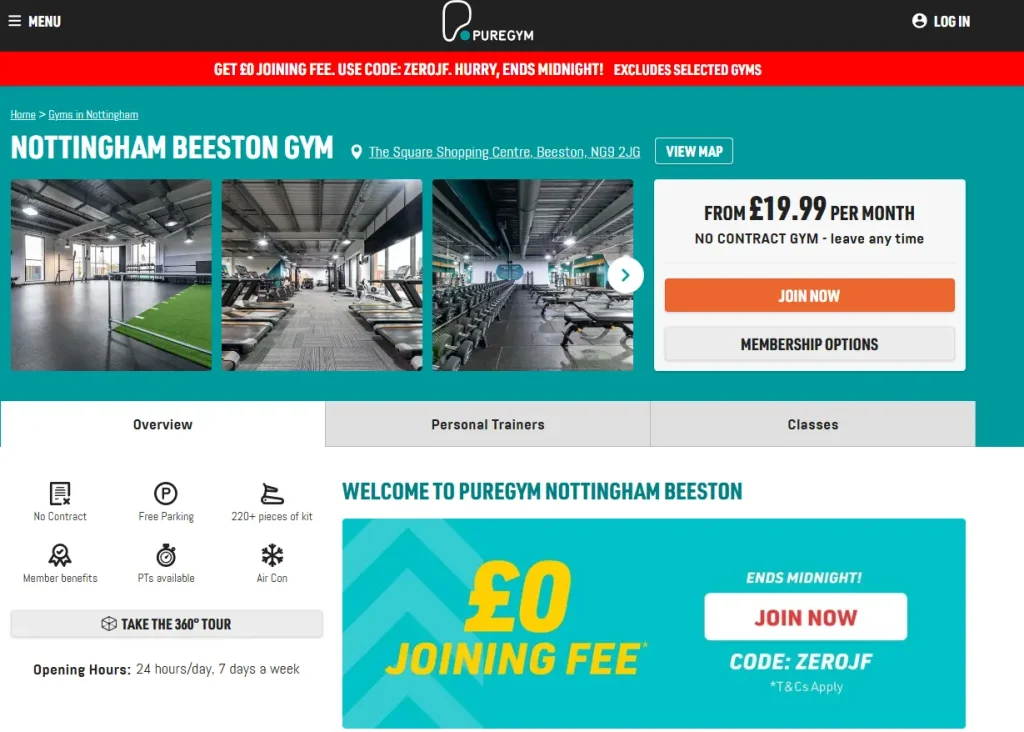
Take PureGym’s landing page for their Nottingham-based gym. The Search ad promotes a £0 joining fee, and the landing page immediately delivers on that promise. Visitors land on a page that clearly highlights the offer, shows real photos of the gym, and displays transparent monthly pricing. It’s clear, consistent, and conversion-focused — exactly what a landing page should be.
Tip 9: Engage and Convert Lost Visitors
Not every visitor converts on the first click. They might be comparing prices, getting distracted, or simply not ready to commit. But that’s when Google Ads remarketing comes in.
You can set up Google Ads campaigns to show targeted ads to people who’ve already interacted with your site but didn’t take action.
To do this, you’ll need to add a remarketing tag to start building lists of past visitors. You can segment these audiences by behaviour, like people who viewed a product page but didn’t buy or those who abandoned their cart. Then, create a Google Ads campaign specifically targeting those lists.
Your remarketing ads should be tailored to the user’s previous action. Show a limited-time offer, highlight a benefit they may have missed, or reinforce trust with reviews or testimonials. The goal is to stay top-of-mind and guide them back at just the right moment.
Tip 10: Continuously Test, Analyse, and Scale
No high-performing Google Ads strategy is ever truly finished. What works today might not work next month — and what underperforms now could be your next big win with the right tweak. That’s why continuous testing and optimisation isn’t optional.
Test different ad variations. Rotate creatives. Experiment with keyword match types, bidding strategies, and audience segments. Analyse your data, spot the patterns, and invest more in what’s delivering results.
You also need to track ROAS, not just CPC. Cheaper clicks don’t mean much if they don’t convert. Review your performance weekly and make small, consistent adjustments rather than huge reactive changes.
The goal is steady, scalable growth — not overnight wins.
What Is the Best Google Ads Strategy?
The best Google Ads strategy is the one built around your goals, budget, and audience.
It focuses on ROI, not just reach. It combines automation with smart, strategic oversight. And it’s driven by data, not guesswork — constantly evolving based on what’s working and what’s not.
If that sounds like a lot to manage, it can be — but that’s exactly what we do. Our Google Ads specialists build and optimise high-performing Google Ads campaigns for ambitious businesses that want high-ROI results. We’re ready to do the same for you.
Want more PPC guidance? Start by reading our step-by-step strategy guide:
FAQs
What is a good monthly budget for Google Ads?
Your budget depends on your industry, competition, and goals. Luke Nicholson recommends: “For small to medium-sized businesses, a reasonable starting budget might be between £800 and £4,000 per month. For larger businesses or those in competitive industries, you might need to allocate upwards of £8,000 per month. The important thing is to start small, track results, and then increase your budget as you see positive returns.”
How many Google Ads should you run?
Luke Nicholson argues, “It’s all about balance. For most businesses, starting with one to three key campaigns is a good place to begin, whether that’s Search, Display, or Performance Max. From there, you can optimise and refine them based on data. Inside each campaign, it’s also important to test multiple ad groups to target different audience segments, products, or services. This gives you a better chance of reaching the right people with the right message.”
What is the best ROI for Google Ads?
According to Luke Nicholson, “A strong ROI depends on several factors, such as profit margins, customer lifetime value, and competition. It’s difficult to give an exact number, but if you’re an existing business with a proven product, you can reasonably expect a ROAS of between 100% and 1,000%. Higher ROAS figures are possible but not guaranteed.”
Which campaign is best in Google Ads?
Search campaigns are best for direct conversions. Use Display and Video for brand awareness. For eCommerce, Shopping Campaigns are ideal.
How do I beat competitors in Google Ads?
Focus on improving your Quality Score, create better ad copy that highlights what makes you different, and perform competitor research to see what they’re currently doing well. Use competitor insights to outmanoeuvre — not imitate.