Website Redesign Strategy to Get Found in AI Search


If you’re planning a website redesign for 2026, follow our seven-phase strategy to build a site that performs, converts, and gets surfaced in AI answers.
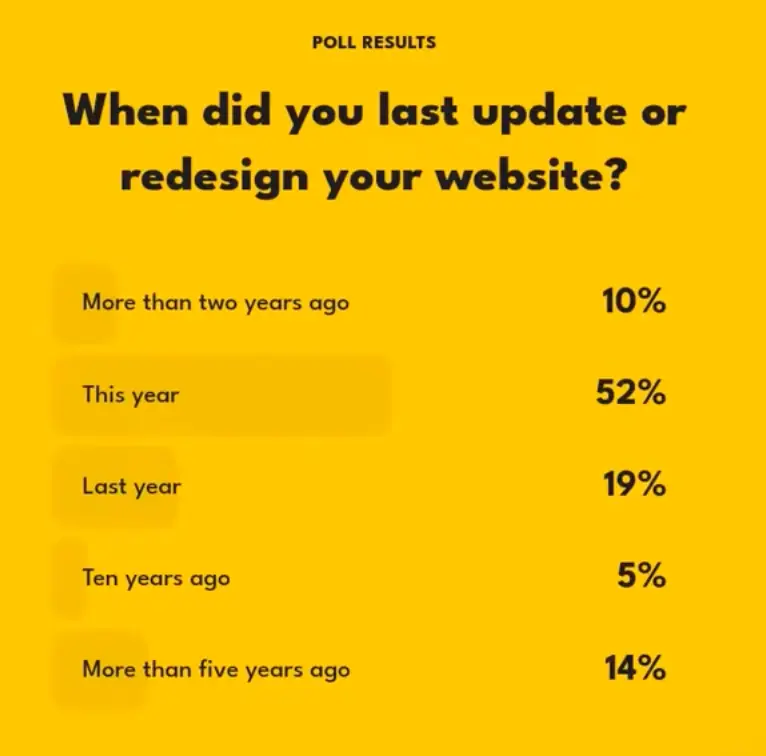
In a recent webinar, Exposure Ninja’s CEO, Charlie Marchant, asked attendees a simple question:
“When did you last update or redesign your website?”
The results showed a significant gap. 71% of businesses had updated their site in the past three years, which is encouraging to see. But 14% hadn’t touched their site in over five years, and 5% admitted it had been a full decade.
In that amount of time, your audience will have changed. Their needs, behaviour, and UX expectations have evolved. Older sites often carry Search Engine Optimisation (SEO) issues that make it harder for Google to understand and rank your pages. All of this gradually reduces your visibility, traffic, and the number of conversions your site can generate.
But in 2026, there’s another important reason to redesign your website: visibility in AI Search.
AI-powered search tools like ChatGPT, Perplexity, and Google’s AI Mode are changing how people find information online. These systems rely on structured content, clear relationships between pages, and well-defined entities to surface and recommend results. If your website isn’t built in a way that AI can interpret, you may simply not appear where your audience is looking for answers or recommendations.
With expert insights from Jenny Nicholson, our Head of Website Development, we’ll guide you through the seven-phase website redesign strategy we use at Exposure Ninja, including specific steps to ensure your site is found, cited, and trusted by AI platforms.
What is a Website Redesign?
When updating a website, there are generally two approaches: a refresh or a full redesign.
A website refresh includes minor, ongoing updates such as replacing images, revising copy, or adjusting layouts. These changes help keep the site looking current without altering its underlying structure.
A website redesign is a more comprehensive update. It involves reworking the site’s structure, design, functionality, and content to enhance performance across usability, visibility, and conversion.
You usually need a full website redesign when:
- Your site structure no longer reflects your products, services, or business priorities.
- Users struggle to navigate or convert due to poor UX or unclear messaging.
- Your site loads slowly or fails to perform well on mobile.
- The design feels outdated and doesn’t reflect your current brand positioning.
- You’re struggling to get to the top of Google.
Now there’s also AI Search. If your site isn’t being cited or recommended in AI answers, you’re missing out on a new AI traffic channel and the conversion opportunities that come with it.
A website redesign isn’t just a design project. It’s a strategic rebuild that influences how your business is discovered, experienced, and trusted online. That’s why it needs a clear, goal-driven website redesign strategy to ensure that your site not only looks better, but functions as a high-performing growth asset.
Warning Signs Your Website Isn’t AI-Friendly
As Tim Cameron-Kitchen, Founder of Exposure Ninja, puts it: “If you’re embarrassed to share your website, if you can’t clearly track its performance, or if it lacks a strong call to action, it’s already costing you leads. And if it’s built on a locked-down platform or all style with no strategy, it’s time for a rebuild.”
These are the classic signs that your website needs a redesign. But now, there’s another key factor to consider: whether your website is AI-friendly.
To show up in ChatGPT answers or Google’s AI Overviews, your site needs to be easy for AI models to crawl, interpret, and confidently recommend.
These tools don’t browse sites the way humans do. They rely on clean structure, semantic HTML, clear content hierarchies, and structured data to understand what your business does, who it serves, and why someone should choose you.
If your site isn’t built with these principles in mind, AI Search tools will struggle to surface your content accurately, or worse, ignore you entirely.
Jenny Nicholson highlights the warning signs your website isn’t AI-friendly:
- Slow page speed. AI tools and users both favour fast-loading sites.
- Heavy JavaScript. Core content hidden behind scripts often goes unread by AI.
- Poor mobile performance. AI prioritises mobile-friendly sites, since that’s where most users are.
- Unclear content structure. No headings, no hierarchy, and unclear labels confuse AI.
- Thin or vague content. Pages without a clear topic or purpose are often ignored.
- Missing structured data. Without schema markup, AI can’t confidently identify what your page is about.
Making your website AI-friendly is no longer optional. It’s becoming essential for brands that want to maintain visibility and stay competitive as the way people search continues to evolve. If any of these sound familiar, you need a website redesign strategy to improve your Share of Voice (SoV) in AI Search.
Things like slow page speed, heavy JavaScript, or poor mobile performance stand out straight away as signs that a site isn’t AI-friendly. If the site relies too much on scripts to load core content, AI tools often miss the important bits. Another big red flag is a messy HTML structure. For example, no headings, no hierarchy, unclear labels. AI models read sites more like screen readers than humans, so if the page structure is chaotic, they struggle to interpret it.
 Jenny Nicholson
Head of Web Development
Jenny Nicholson
Head of Web Development
How to Create a Website Redesign Strategy for AI Search
A website redesign is a significant investment. Redesign costs can range from $3,000 to $75,000, depending on the site’s complexity and your chosen web development partner. It’s also not a quick job, with standard redesign timelines falling between six weeks and six months.
But the benefits of this investment are clear. Websites that are redesigned with AI Search Optimisation in mind can see a 40% increase in AI Search visibility. That means more brand salience, more AI traffic, more agentic AI direct purchases, and more AI-driven leads in 2026.
With those facts in mind, it’s clear that you need a solid website redesign strategy that balances user experience, visual design, technical performance, and AI Search-readiness. That’s how you turn the cost and time into tangible ROI.
Here’s how to approach each phase of your website redesign strategy with AI visibility at the core:
1. Discovery
The discovery phase sets the foundation for a successful website redesign. Traditionally, this includes auditing your existing site’s performance by looking at analytics, user behaviour, conversion rates, and competitor benchmarks.
But with AI Search in the mix, the scope expands.
You now need to assess how well your site can be understood and surfaced by AI tools. This means auditing not just for SEO performance and user friendliness, but for AI interpretability.
Jenny Nicholson outlines what we now assess during the discovery phase for AI Search readiness, which you can bring into your website redesign strategy:
- FAQ or How-To schema. Is structured data in place to help AI interpret and cite common questions?
- Q&A format on key pages. Are customer questions answered in a clear, scannable Q&A layout?
- Logical heading hierarchy. Are headings used consistently and clearly, so both users and AI can navigate the page?
- Plain English, not jargon. Is the content written in everyday language that’s easy for models to parse?
- Entity clarity. Are your brand, product, and service names clearly defined and consistent across the site?
- Trust signals. Are author bios, About pages, and social proof (like reviews) present to reinforce authority?
The goal of this phase is to uncover where your current site falls short both in traditional SEO terms and in how AI tools interpret and trust your content. These insights then shape your redesign strategy from the ground up.
2. Site Architecture and UX Planning
Site architecture defines how your content is structured, grouped, and accessed. In a traditional website redesign, this means mapping out page hierarchies, navigation menus, and user journeys to ensure a smooth and intuitive experience.
For AI Search, architecture becomes even more important. AI tools interpret your site through HTML structure, internal links, headings, and schema markup. If your structure is inconsistent, broad, or unclear, AI systems are more likely to misinterpret or overlook your content.
“Navigation doesn’t need to become more complicated for AI Search; if anything, simpler is better,” says Jenny Nicholson. “What matters most is consistency and clear grouping. When your nav matches your actual service or product structure, AI models can follow it much more effectively. Confusing, overly broad, or duplicated menu items make it harder for AI to map the site.”
Our website redesign for Elite Renewables shows how clear site architecture directly improves both user experience and AI visibility.
The original site lacked structure. It combined all audiences into a single journey and offered limited service information. Navigation was cluttered, and key content was buried, making it hard for users and AI tools to understand.
We rebuilt the site around clarity and segmentation:
- We split the customer journey between homeowners and businesses using a segmented mega menu.
- We created dedicated service pages for each product and audience, with consistent layouts and headings.
- We structured navigation to match how customers actually research and enquire.
By aligning structure with real-world user journeys and AI reading logic, Elite Renewables’ new site became a high-performing lead generator almost immediately, delivering 20 qualified leads in the first 12 days during August, a typically quiet period.

Site architecture matters even more when AI agents are involved. Tools like ChatGPT’s Agent Mode are beginning to interact with websites on behalf of users, such as booking appointments or completing a purchase.
Jenny Nicholson explains: “These AI agents won’t ‘figure things out’ intuitively the way a human might. They don’t skim pages or piece things together visually. They follow whatever structure we give them in the HTML: headings, internal links, schema, and the relationships between pages.
This matters most for the journeys you expect people to take through the site. For example, on an eCommerce site, someone might go from a product page to the specs, then to the basket, then to checkout. Humans can usually make sense of that path even if the site isn’t perfect because we click around and work it out.
AI agents don’t. If that journey isn’t clearly mapped out, the assistant won’t understand how the steps connect. It may surface incomplete details, miss the next step entirely, or recommend the wrong page because the relationships aren’t obvious.
So clearer pathways and a predictable structure make the process easier for both humans and AI to follow.”
You need to treat site architecture and UX planning as the foundation of your website redesign strategy. When your structure is built for clarity, both users and AI agents will understand how to move through your site, and that’s what leads to better visibility, stronger engagement, and higher conversion rates.
When planning your redesign for AI Search-readiness:
- Map journeys clearly for every audience and goal.
- Align navigation with your real product or service structure.
- Use internal links to reinforce relationships between pages.
- Add schema markup to help AI interpret content types and intent.
- Keep each page focused on one topic or purpose.
- Avoid duplication in menus, headings, and content.
Navigation doesn’t need to become more complicated for AI Search; if anything, simpler is better. What matters most is consistency and clear grouping. When your nav matches your actual service or product structure, AI models can follow it much more effectively. Confusing, overly broad, or duplicated menu items make it harder for AI to map the site.
Jenny Nicholson
Head of Web Development
3. Design
Design is where your website redesign strategy becomes visual. Traditionally, this phase focuses on creating layouts, choosing colour schemes, selecting typography, and building brand identity into the site.
But in 2026, design has a dual audience: people and machines.
“We’re designing for two audiences now: people and machines,” says Jenny Nicholson. “People love visuals, colour, layout. AI platforms need clarity, labels, and structure. So the trick is to make pages visually rich but keep the underlying markup clean and meaningful.”
The visual layer needs to support structural clarity. If everything is built inside graphics or overly complex code, AI platforms like ChatGPT will fail to parse the content, meaning your key messages may never surface in AI-driven results.
When we redesigned the website for Transparent, a global procure-to-pay consultancy, we took an innovative approach by using B2C-inspired design principles in a B2B space.
- The visual design was modern and accessible, with generous whitespace and strong contrast.
- Behind the scenes, we used semantic HTML, clear heading structures, and labelled content to ensure clarity for AI tools.
- Every page was built with a single intent of guiding users toward a report download or discovery call.
This helped drive 51 qualified leads in four months within a high-ticket SaaS space, achieving a 0.45% sitewide conversion rate. We were even more proud when we were shortlisted for the Best B2B Website of the Year at the UK Digital Excellence Awards.
To make your website both visually compelling and AI-readable, include the following in your design process:
- Use semantic HTML tags to structure content in a meaningful way.
- Keep each page focused on one topic or purpose.
- Maintain a clear and logical heading hierarchy.
- Avoid embedding key information inside images or decorative elements
- Use alt text, ARIA labels, and descriptive link text to support accessibility and AI interpretation.
- Ensure high contrast and whitespace for readability without sacrificing structure.
- Keep the design mobile-first to align with how AI agents and users access content.
- Support all calls to action (CTAs) with both visual clarity and semantic structure.
4. Development
The development phase is where design becomes a functioning website. In a traditional website redesign strategy, this involves building pages, integrating forms, setting up hosting, and ensuring the site functions smoothly across various devices and browsers.
But for AI Search visibility, this is the phase where technical missteps can block AI entirely. Even well-designed pages can become invisible to AI tools if the underlying code isn’t accessible, structured, or indexable.
Jenny Nicholson highlights what to avoid:
- Hiding key content behind JavaScript. If your main copy only loads via JavaScript, AI models may never see it.
- Lazy-loading the main copy. AI tools crawl fast and won’t always wait for delayed content to load.
- Putting everything into modal windows. If critical information is hidden behind clicks, AI can’t access it.
- Rogue noindex tags or misconfigured robots.txt files. These can accidentally block AI crawlers.
- Custom components without meaningful markup. They look great, but cause issues for crawlers and AI models.
If your site sells products or services online, checkout development deserves special attention for AI agents. “AI agents need predictable steps,” Jenny Nicholson explains. “They need product data, pricing clarity, and a checkout flow that follows a logical order. If an agent can’t understand how to add something to a basket or see the shipping rules, it won’t recommend the product.”
Shopify, for example, has started rolling out features in the U.S. that help AI agents understand products, pricing, and checkout steps. But for this to work, your store needs clean product data, consistent naming, and a predictable checkout journey. If key steps are hidden behind scripts or overly customised, AI won’t understand how to complete the process.
“Shopify has also made it clear that fully automated purchases aren’t allowed; there still has to be a person involved in the final decision,” explains Jenny Nicholson. “So it’s not about creating a hands-off robot checkout; it’s about making your product information and checkout steps easy for both people and AI to follow.”
Development is where AI accessibility is either enabled or blocked. A clean, structured build ensures your site is understood by the machines that are shaping how customers find and act online in 2026.
5. Integrations and Features
Integrations and features enhance your site’s functionality, from CRM connections to live chat tools, analytics platforms, and marketing automation. In a standard website redesign strategy, this phase ensures your site works seamlessly with the rest of your tech stack.
For AI Search, specific integrations and features actively improve your visibility and usefulness, such as:
- Crawlable on-site search tools which expose structured search results that help AI and users understand the breadth of your content.
- Knowledge base platforms create structured, interlinked documentation that AI models can scan and cite.
- Comparison tables and selectors which output content as HTML tables or bullet lists allow AI to parse product or service differences easily.
- Glossary or terminology modules help define key terms consistently to reinforce brand and service clarity across AI responses.
- Interactive tools, such as calculators, checklists, or quizzes, should display results in clean HTML rather than hiding them behind JavaScript.
- Schema-enabled plugins that generate structured markup AI can read and use.
- CRM-integrated lead forms, while not visibility tools, help convert AI-sourced traffic and track engagement more effectively.
The goal isn’t to overload your site with tech, but to choose features that deliver value to users and surface clearly to AI.
6. Testing
Testing is where you catch issues before launch, and it is a critical phase in your website redesign strategy.
Typically, this means checking broken links, testing forms, reviewing mobile responsiveness, and ensuring the site works across browsers. For AI Search, testing now includes checking how well AI tools can interpret and recommend your site.
“Tools like Lighthouse and Screaming Frog still do a great job of catching the technical issues such as slow scripts, missing metadata, broken internal links that affect how AI reads a site,” Jenny Nicholson explains.
But she also recommends adding Microsoft Clarity to your testing toolkit. “Microsoft Clarity highlights things like rage clicks, dead clicks, hesitation, and pages where people bounce between sections trying to work out what to do next. If people struggle to make sense of the structure, an AI platform or agent almost certainly will too.”
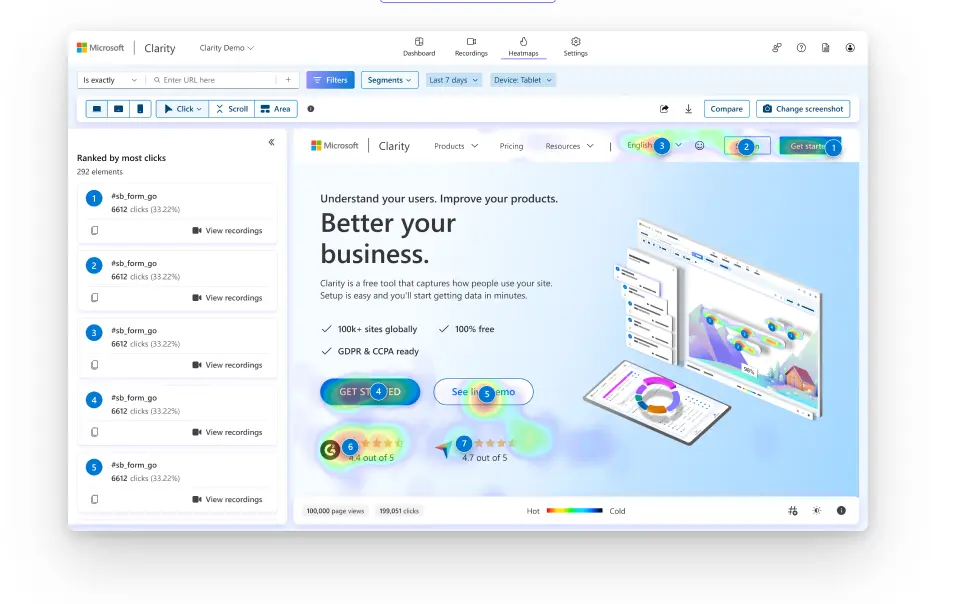
Watching session recordings can quickly reveal where both humans and machines are getting lost. It also indicates where content loads too late or is positioned too far down the page, both of which can cause AI to pick up incomplete or outdated information.
Jenny Nicholson also recommends running prompt-based testing in ChatGPT or Perplexity. Simple questions like “What does [your company] do?” or “Where do I find pricing for [your company]?” reveal very quickly whether the site gives AI enough clarity to understand the basics.
7. Launch and Post-Launch
The launch phase is when your redesigned site goes live. This is an exciting milestone, but not the final step. Post-launch is where you validate that everything works as intended and begin monitoring how both users interact with your new site.
“Once the site goes live, submit the sitemaps, double-check that all schema is set up correctly, and make sure there are no errors that could confuse site visitors,” says Jenny Nicholson.
For AI Search, post-launch is about ensuring AI tools interpret your site correctly and continue to do so over time.
Jenny Nicholson explains, “The next step is monitoring how those tools actually interpret the site. If an AI Search result gives a strange summary, misses key points, or misrepresents what the business does, it usually means something still needs adjusting in the content or structure.”
Instead of thinking of launch as the finish line, treat it as the point where real performance tracking begins.
“AI Search is always shifting, and your site has to shift with it,” Jenny Nicholson adds. “The brands that stay visible are the ones making small, regular improvements to how their content is structured and presented. This keeps the site accurate, trustworthy, and useful both to users and to AI systems over time.”
Get Your Website Ready for AI Search
A future-ready website redesign strategy focuses on building a site that’s clear to users and understandable to AI. That means:
- Auditing how your site is interpreted by both humans and AI tools.
- Structuring content, navigation, and internal links with clarity and consistency.
- Designing pages that look great visually and use clean, semantic HTML.
- Developing a codebase that loads key content in the HTML, not behind scripts or modals.
- Adding structured features like knowledge bases, comparison tools, and glossaries.
- Testing how AI platforms describe and surface your site, and refining based on results.
- Monitoring how your content appears in AI-generated answers post-launch.
At Exposure Ninja, we’ve refined a website development process that balances design, UX, technical performance, and now, AI Search readiness. Whether you’re a renewable energy installer like Elite Renewables or a high-ticket SaaS firm like Transparent, we can help you build a site that gets found, cited, and trusted by both people and AI.
Ready to future-proof your website? Request a marketing review, and let’s build your roadmap.
FAQs
What kind of website structure works best for AI Search?
“Straightforward structures are best: clear categories, clear parent-child relationships, and pages that do one job really well. AI is good at interpreting intent when the site gives it strong signals. It struggles with vague, catch-all pages or confusing folder paths,” explains Jenny Nicholson.
How does agentic AI change website UX?
Jenny Nicholson says, “We’re designing for transparency and clarity. The better an AI assistant can understand what a business offers, the easier it becomes for that assistant to guide the user. UX becomes more about clean journeys, logical naming, strong content labels, and predictable patterns.”
How do I know if my site is visible in AI Search?
You can perform a manual AI Search Optimisation audit by asking ChatGPT or Perplexity questions your target audience might ask, and seeing if your business is mentioned or linked. For a more structured approach, use platforms like Profound, Peec AI, or Semrush’s AI Visibility Toolkit to track citations and source-level visibility. These tools help you see where you stand and what content is being surfaced.
*Disclosure: This page contains referral links. If you purchase through these links, we may receive a commission at no additional cost to you.